


Fallout Pip-Boy SE Watch Face
4.7357.00 Reviews
App Specs
- Version
- Varies with Device
- Updated On
- License
- $1.99
- Downloads
- 100,000+
- Developer
- Facer Studios
- Categories
- Personalization
- Platform
- Android
Screenshots
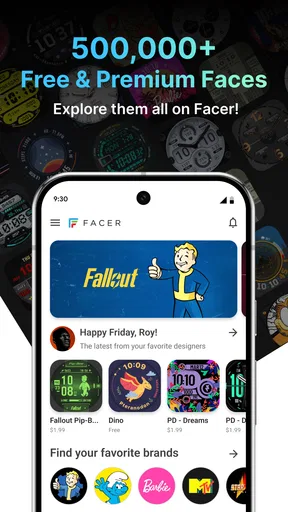
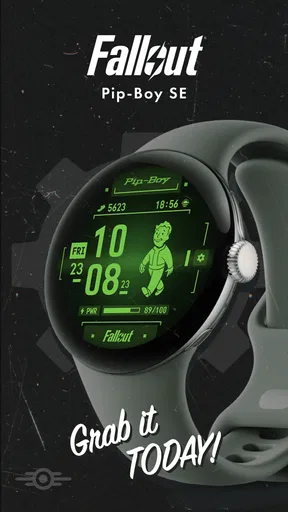
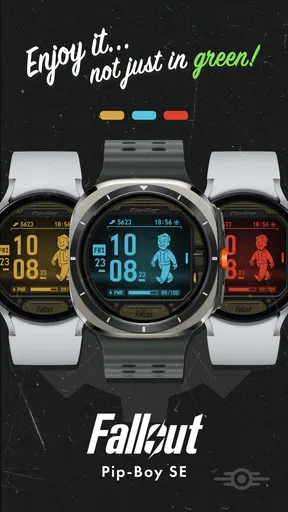

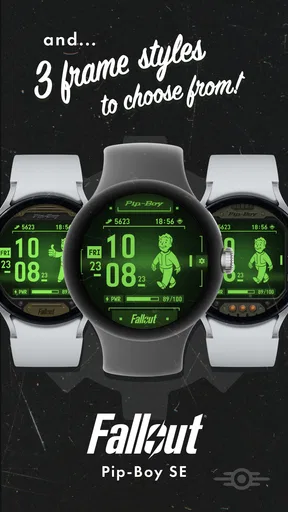
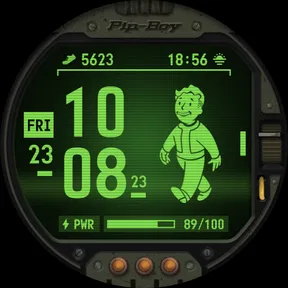
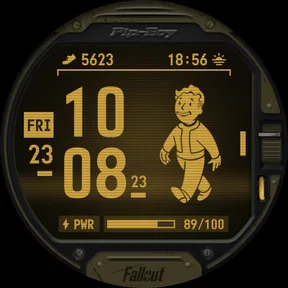
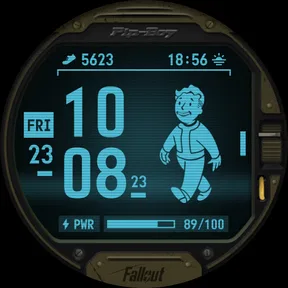
 Analysis by AppCompare
I like themed watch faces most when they make checking the time feel more personal without turning a quick glance into a chore. This one is built around Fallout’s familiar Pip-Boy look, so it makes the most sense for fans who want that retro game-inspired style on their wrist. The Fallout Pip-Boy SE Watch Face is a personalization app from Facer Studios, and its appeal is fairly specific: it dresses a smartwatch in the visual language of the wasteland rather than trying to replace a general-purpose watch face.
Where setup can feel less simple than it looks
The first hurdle with a watch-face app is often not choosing a design but getting it from the phone to the watch. A face may be easy to browse on one device while the actual installation and selection happen through a companion app, a watch menu, or both. I would start by checking that the watch is paired with the phone and that the relevant watch-face app is available on both devices before trying to install anything. That basic check can save a lot of aimless tapping.
It also helps to distinguish the app’s role from the watch’s role. The app is the route to the Pip-Boy design; the smartwatch is where you ultimately need to select and view it. If the face appears on the phone but not on the watch, that does not automatically mean the design has failed. I would first open the watch’s face-selection screen and look for it there, then revisit the phone-side app if it still is not available.
Small checks that prevent avoidable friction
Before paying, I would confirm that the product is the Special Edition face I actually want and that my watch supports the required face format. The app costs $1.99, so checking the device and installation route first is a sensible way to avoid buying on impulse and then discovering that the setup path is not a fit for my particular hardware. The Everyone age rating makes it broadly suitable as a visual theme, but the purchase is still best treated as a deliberate choice rather than a free experiment.
When a design relies on a distinctive interface, legibility matters as much as nostalgia. I would judge it in the lighting and situations where I normally check my wrist: outdoors, indoors, and during a quick glance while moving. If the details are too busy at the size of your display, a simpler face may serve you better even if the Pip-Boy artwork is more appealing. A watch face is something you look at repeatedly, so that trade-off becomes clearer after ordinary use than it does while browsing a preview.
Recovering when the face does not appear
If installation seems stuck, I would avoid repeating the same action several times. First check that the watch and phone are still connected, then give any transfer a moment to complete. Next, reopen the watch-face selection area and see whether the design has arrived there. If it has, select it from the watch rather than restarting the process. If it has not, closing and reopening the relevant app and checking the connection again is a calmer next step than uninstalling everything straight away.
There is also a useful distinction between a face that is installed and one that is actively selected. A successful download does not always mean it has replaced the current display. I would check the watch itself after installation, select the Pip-Boy face explicitly if needed, and then see whether the result persists after leaving the settings screen. That simple sequence helps separate a transfer delay from a selection issue.
Worth Reading Before You Choose

EA SPORTS FC Mobile 26 Is a Bigger Football Game, but It Takes Time

Flipboard Shows What News Apps Must Do Beyond the Feed

Switching to Android Auto Means Rethinking Your Driving Routine

Google Calendar Makes a Crowded Week Easier to Manage

Ludo King Makes the Most of the Minutes Between Plans

Baby Panda World Brings Quick Play to Modern Phones, but Its Game Library Feels Busy
When the watch or connection may be the issue
A missing face, delayed update, or blank-looking detail may come from the phone-watch connection or the watch’s own display behavior rather than from the design itself. I would check whether other watch content is syncing normally before blaming this particular face. If other changes are also failing to reach the watch, reconnecting the devices or following the watch maker’s usual troubleshooting steps is more appropriate than repeatedly reinstalling the Pip-Boy design.
Battery expectations are another area where I would keep the test practical. A themed display can look different in an always-visible state than it does when the watch is active, and screen settings affect what you see and how the watch behaves. If endurance matters to you, compare a normal day with the face against your usual setup before deciding it is responsible for a change. That gives you a more useful answer than judging battery life from a short trial.
First Impressions: A Blast from the Past
Right off the bat, the Pip-Boy SE Watch Face hits you with a wave of nostalgia. Remember those days spent exploring the wasteland with nothing but your trusty Pip-Boy? Well, now you can have that iconic device right on your wrist. The design is impeccable, staying true to the retro-futuristic aesthetic that makes Fallout so unique. It’s like carrying a piece of the game with you, and honestly, it’s a fantastic conversation starter.
Features That Make It Stand Out
Diving deeper into its features, the watch face doesn’t just look cool; it’s packed with functionality. At a glance, you can check the time, date, and your battery life. But what really sets it apart is the level of customization. You can tweak the color schemes, adjust the brightness, and even choose what stats you want to display. It’s like having a mini Pip-Boy that’s tailored just for you.
One feature that I found particularly nifty is the ability to display real-world weather conditions. It’s a nice touch that keeps you informed without having to pull out your phone. Plus, the animation of the little vault boy reacting to different weather conditions is just downright adorable!
Installation and User Experience
Installing the watch face was a breeze. If you’re already familiar with how to change watch faces on your device, this won’t be any different. For those new to it, the app comes with a step-by-step guide that’s super easy to follow. Within minutes, you’ll have your smartwatch transformed into a Pip-Boy.
Once installed, the user experience is smooth and intuitive. The interface is responsive, and navigating through different settings is straightforward. I didn’t experience any lag or glitches, which is always a win in my book. It’s clear that the developers put a lot of thought into making sure the app runs seamlessly.
Compatibility and Performance
Let’s talk about compatibility for a second. The Fallout Pip-Boy SE Watch Face is available for both Android and iOS platforms, which is great news because nobody’s left out. On Android, it works perfectly with Wear OS smartwatches, and for the Apple folks, it’s compatible with most versions of the Apple Watch.
Performance-wise, it doesn’t seem to drain the battery any more than other watch faces I’ve tried. It’s efficient, and you can go about your day without worrying about needing a midday charge. That said, like any watch face with animations, it might consume a tad more battery if you have all features cranked up to the max.
Making the Pip-Boy work for an ordinary day
The strongest use case is not a long session of inspecting the watch; it is the small, repeated glance between tasks. I can imagine wearing it on a commute, checking the time before a meeting, and enjoying the Fallout styling without needing to open a game or phone app. Weather information is more useful in that routine than it might first sound: it can help me decide whether to bring a layer before leaving, while the animated character adds personality to an otherwise practical check.
For a busy day, I would keep the face focused on the details I actually consult. The option to choose displayed stats is valuable precisely because a crowded watch screen can be harder to read at a glance. I would begin with the time and the few indicators I use most, then add anything else only if it remains legible. That is a more useful customization approach than trying to fit every available detail onto the screen just because the interface allows it.
There is a small trade-off between the full character of the design and quick readability. The visual density is part of the Pip-Boy identity, but someone who checks a watch while running, carrying bags, or working with their hands may prefer a cleaner face with larger, simpler information. I would treat this as a themed daily option for relaxed glances, not automatically as the best choice for every activity or every moment.
How it compares with plainer watch faces
Compared with a basic digital face, this one offers a stronger sense of theme and more personality, while a plain face usually wins when the only goal is to read the time as quickly as possible. Compared with a highly customizable general face, the Pip-Boy design has a more defined visual identity: its appeal comes from looking like part of Fallout, not from being a blank canvas for any style. That makes the choice straightforward. If the game’s interface is what you want to see, this design has a reason to exist; if you mainly want a neutral display, an ordinary built-in option may be simpler.
I would also separate visual customization from practical flexibility. Changing colors, brightness, or displayed information can help the design suit a particular watch and routine, but it does not turn the Pip-Boy aesthetic into a minimal face. Someone who wants a different look every day may get more mileage from a broad collection of interchangeable designs. Someone who wants one recognizable Fallout-inspired face and a few useful adjustments is more likely to appreciate this focused approach.
Who will enjoy it—and who may want another option
I would recommend it most readily to Fallout fans who already wear a compatible smartwatch and want their interest in the series to show in a subtle, everyday way. It also suits someone who enjoys themed interfaces and is willing to spend a little time making the display readable for their own watch. The average rating is 4.4 from around three thousand ratings, and the app has been installed over one hundred thousand times; that suggests a healthy audience, though personal taste and device fit matter more than popularity for this kind of purchase.
I would hesitate if you rarely change watch faces, strongly prefer a stripped-down screen, or need every element to be readable in a fast glance. It is also not the right buy if your watch does not support the installation route available to you. A free standard face may be a better fit when practicality is the only priority, while a general-purpose face collection makes more sense for someone who wants variety rather than a single franchise look.
Is It Worth the Download?
So, is the Fallout Pip-Boy SE Watch Face worth downloading? Absolutely. If you’re a die-hard Fallout fan, this is a must-have. It’s a fantastic blend of style and function, and it’s sure to bring a smile to your face every time you check your wrist. Even if you’re new to the Fallout universe, the unique design and customization options make it a fun addition to any smartwatch.
Overall, the Fallout Pip-Boy SE Watch Face is more than just a nod to a beloved game; it’s a fully functional, stylish, and interactive watch face that adds a touch of whimsy to your day. So, go ahead and give it a spin. Who knew checking the time could be this much fun?
My practical verdict
My recommendation comes with one clear condition: buy it for the Pip-Boy presentation, not because you expect it to outperform a simple utility face. Facer Studios is the developer, and the app sits in the personalization space; its purpose is to make the watch feel more like a Fallout accessory while keeping useful glanceable information in view. The release date is April 5, 2024, and the store summary points to the Special Edition design, so I would treat it as a specific themed purchase rather than a promise of a broad watch-face library.
The $1.99 price is easiest to justify if you already know you enjoy Fallout’s visual style and intend to wear the face often. I would first check compatibility, then install it and spend a little time reducing screen clutter and testing readability in my normal routine. If the weather detail and selected stats are clear on your display, it can be a satisfying everyday choice. If the design feels busy after a day or two, switching back to a simpler face is a reasonable outcome, not a failure.
In short, this is for the person who wants a recognizable Pip-Boy on their wrist and accepts the small setup and readability trade-offs that come with a themed design. I would skip it in favor of a plain or more flexible alternative if quick, minimal information matters more than character. For the right wearer, though, it turns an ordinary time check into a small Fallout moment without asking the watch to be anything more than a watch face.
Pros
- Seamlessly integrates with smartwatch functions.
- Displays real-time notifications effectively.
- Customizable interface to suit personal style.
- Retro design appeals to Fallout fans.
- Low battery usage despite rich features.
Cons
- Limited compatibility with older devices.
- Initial setup can be slightly confusing.
- Some features locked behind paywall.
- Occasional lag in notification updates.
- No offline functionality for certain features.
FAQs for Fallout Pip-Boy SE Watch Face
What is the Fallout Pip-Boy SE Watch Face app?
The Fallout Pip-Boy SE Watch Face app is a dynamic smartwatch face inspired by the iconic Pip-Boy device from the Fallout series. It brings the retro-futuristic aesthetic of the game to your wrist, offering a unique and customizable interface that fans of the series will love. Compatible with both Android and iOS devices, it integrates seamlessly with your smartwatch.
How do I install the Fallout Pip-Boy SE Watch Face on my smartwatch?
To install the Fallout Pip-Boy SE Watch Face, first ensure your smartwatch is compatible with the app. Download it from the Google Play Store or Apple App Store. After installing, go to your smartwatch settings, select the watch face section, and choose the Pip-Boy SE option to activate it.
Are there any customization options available for the Pip-Boy SE Watch Face?
Yes, the Pip-Boy SE Watch Face offers several customization options. Users can adjust colors, widgets, and display settings to match their personal preferences. This allows for a personalized experience, making your smartwatch both functional and a reflection of your love for the Fallout series.
Does the Fallout Pip-Boy SE Watch Face affect battery life?
While the Fallout Pip-Boy SE Watch Face is designed to be efficient, any watch face with dynamic graphics and animations can slightly affect battery life. Users should monitor their smartwatch’s battery performance and adjust settings if necessary, such as reducing brightness or turning off animations, to optimize battery usage.
Is the Fallout Pip-Boy SE Watch Face free to download?
The Fallout Pip-Boy SE Watch Face may be available as a free download with basic features, but additional customization options and premium features might require an in-app purchase. Users should check the app store for any pricing details or offers that might be available at the time of download.


